smarvus_tib <- readr::read_csv("data/smarvus_data.csv")Skills Lab 04: Data Summaries
Data
Codebook
Run this code chunk to open the Codebook in the Viewer tab.
ricomisc::rstudio_viewer("smarvus_codebook.html", "data")Today’s Task
You are joining an ongoing research project, perhaps on a placement year or for your final-year project. The project is investigating accessibility at University, specifically how diagnosis of specific learning differences (SpLD) impacts students’ experiences. A key research question is whether students with or without diagnosis of SpLD differ in their average levels of adverse experiences, such as anxiety, worry, and fear of being perceived negatively.
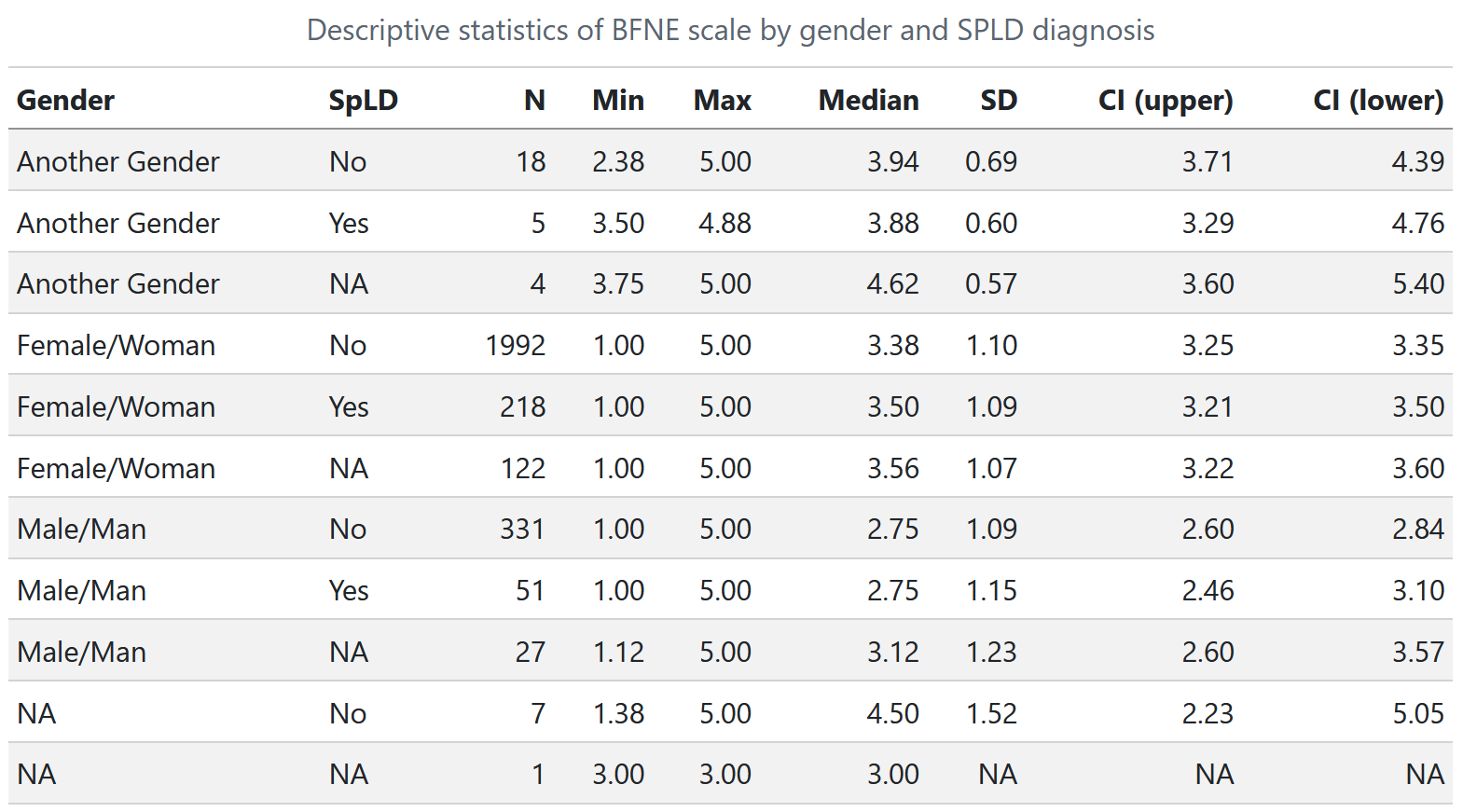
The previous research assistant has already created a summary table of one of the key outcomes, Fear of Negative Evaluation, for the upcoming journal article. Unfortunately, they only included an image of the table, and didn’t save the code to create it! The table looks like this:
Which Measure(s)?
Take a minute to look at this table. What do each of the measures in this table tell us? Why is it useful to calculate and report them? Is there anything important missing that we should include in the table?
Tip
See Tutorial 04 for an explanation!
What To Do?
Our task is to recreate this table, making sure to include all key measures.
Generic Summaries
First, we can easily get some overall information about our numeric variables with some useful functions.
summary(smarvus_tib)

datawizard::describe_distribution(smarvus_tib)
Consider This:
What is useful about the output from these summary functions? What can we use them for?
What can we NOT (easily) use them for?
Solution
This is a great way for you, the analyst, to get a quick look at the data. Without having to do any extra coding, you have useful overall information about most or all of the variables in your dataset. This lets you easily spot problems and get a sense of your data.
However, there are two main issues. First, we can’t very easily see or control what is included in this output. Both summary() and describe_distribution() have some arguments we can change (see the help documentation), but not everything, and it isn’t obvious how to do this.
Second, this is not a great way to present this information. This output isn’t nicely formatted; it would not be a good way to include this summary info in a report.
So, we should make our own summaries instead, that include the information we want, and that look nice in our reports (or take-away papers 👀).
Summarising A Variable
First, let’s calculate summary statistics for the outcome variable, bfne, using dplyr::summarise().
smarvus_tib |>
  dplyr::summarise(
    n = dplyr::n(),
    min = min(bfne, na.rm = TRUE),
    max = max(bfne, na.rm = TRUE),
    ## Mean wasn't in the original table, but is a crucial element for the research question
    mean = mean(bfne, na.rm = TRUE),
    median = median(bfne, na.rm = TRUE),
    sd = sd(bfne, na.rm = TRUE),
    ci_lower = ggplot2::mean_cl_normal(bfne)$ymin,
    ci_upper = ggplot2::mean_cl_normal(bfne)$ymax
  )
# A tibble: 1 × 8
n min max mean median sd ci_lower ci_upper
<int> <dbl> <dbl> <dbl> <dbl> <dbl> <dbl> <dbl>
1 2776 1 5 3.24 3.38 1.12 3.20 3.28
Consider This: CIs vs SDs
Why is it that this variable has a relatively large SD (compared to the scale it’s measured on), but an extremely narrow CI?
Solution
Remember that CIs are calculated based on the square root of the sample size - and that’s quite big here!
Consider This: Returning
NAs
Why is it that functions like mean and median return NA if they have even one missing value?
Tip
See Tutorial 04 for an explanation!
Summarising by Groups
Next, we want to split our summary table into different rows, one for each category in two predictors: gender and spld.
First, what happens when we group_by() a variable?
smarvus_tib |>
  dplyr::group_by(spld)
# A tibble: 2,776 × 34
# Groups: spld [3]
unique_id country language university degree_major degree_year age gender
<chr> <chr> <chr> <chr> <chr> <chr> <chr> <chr>
1 X8V0T6 Netherla… English Universit… Psychology 1st Year 18-21 Femal…
2 J3W3Y7 England English Universit… Psychology 1st Year 18-21 Femal…
3 S7C2L2 England English Universit… Psychology 1st Year 22-25 Femal…
4 Y4Z6A6 Scotland English Universit… Psychology 1st Year 26+ Femal…
5 L2O9Z1 Australia English Macquarie… Psychology 1st Year 18-21 Femal…
6 B5I6O0 Austria German Universit… Psychology 1st Year 18-21 Femal…
7 N8H9D1 England English Loughboro… Psychology 1st Year 18-21 Male/…
8 F2J7V4 England English Bournemou… Psychology 1st Year 18-21 Femal…
9 N9M3V8 Germany German Universit… Psychology 1st Year 18-21 Femal…
10 O3F8F8 Australia English Macquarie… Psychology 1st Year 18-21 Femal…
# ℹ 2,766 more rows
# ℹ 26 more variables: spld <chr>, in_person_lectures <chr>,
# in_person_practicals <chr>, atms_per <dbl>, belief <dbl>, bfne <dbl>,
# cas_cre <dbl>, cas_non <dbl>, crt <dbl>, ius_sf_inh <dbl>,
# ius_sf_pro <dbl>, lsas_sr_per <dbl>, lsas_sr_soc <dbl>, ngse <dbl>,
# r_mars_course <dbl>, r_mars_num <dbl>, r_mars_test <dbl>, r_tas_bod <dbl>,
# r_tas_ten <dbl>, r_tas_tes <dbl>, r_tas_worry <dbl>, stars_ask <dbl>, …Notice the Groups: spld [3] at the top of our tibble. This means that our tibble is grouped by the values of our spld variable, so any subsequent calculations will take place inside those groups. Let’s see what that might look like.
## SAME code as above, just with the new group_by line!

smarvus_tib |>
  dplyr::group_by(spld) |> ## Only this is added
  dplyr::summarise(
    n = dplyr::n(),
    min = min(bfne, na.rm = TRUE),
    max = max(bfne, na.rm = TRUE),
    mean = mean(bfne, na.rm = TRUE),
    median = median(bfne, na.rm = TRUE),
    sd = sd(bfne, na.rm = TRUE),
    ci_lower = ggplot2::mean_cl_normal(bfne)$ymin,
    ci_upper = ggplot2::mean_cl_normal(bfne)$ymax
  )
# A tibble: 3 × 9
spld n min max mean median sd ci_lower ci_upper
<chr> <int> <dbl> <dbl> <dbl> <dbl> <dbl> <dbl> <dbl>
1 No 2348 1 5 3.23 3.25 1.12 3.18 3.27
2 Yes 274 1 5 3.26 3.38 1.12 3.13 3.39
3 <NA> 154 1 5 3.38 3.56 1.10 3.20 3.56So, we get the same information as we did before, but now it’s split up by the groups in the spld variable.
Summarising by Multiple Groups
What do you think will happen when we add in a second categorical variable?
## SAME code as above, now with two categorical variables in group_by

smarvus_tib |>
  dplyr::group_by(gender, spld) |>
  dplyr::summarise(
    n = dplyr::n(),
    min = min(bfne, na.rm = TRUE),
    max = max(bfne, na.rm = TRUE),
    mean = mean(bfne, na.rm = TRUE),
    median = median(bfne, na.rm = TRUE),
    sd = sd(bfne, na.rm = TRUE),
    ci_lower = ggplot2::mean_cl_normal(bfne)$ymin,
    ci_upper = ggplot2::mean_cl_normal(bfne)$ymax
  )
# A tibble: 11 × 10
# Groups: gender [4]
gender spld n min max mean median sd ci_lower ci_upper
<chr> <chr> <int> <dbl> <dbl> <dbl> <dbl> <dbl> <dbl> <dbl>
1 Another Gender No 18 2.38 5 4.05 3.94 0.688 3.71 4.39
2 Another Gender Yes 5 3.5 4.88 4.03 3.88 0.596 3.29 4.76
3 Another Gender <NA> 4 3.75 5 4.5 4.62 0.568 3.60 5.40
4 Female/Woman No 1992 1 5 3.30 3.38 1.10 3.25 3.35
5 Female/Woman Yes 218 1 5 3.35 3.5 1.09 3.21 3.50
6 Female/Woman <NA> 122 1 5 3.41 3.56 1.07 3.22 3.60
7 Male/Man No 331 1 5 2.72 2.75 1.09 2.60 2.84
8 Male/Man Yes 51 1 5 2.78 2.75 1.15 2.46 3.10
9 Male/Man <NA> 27 1.12 5 3.08 3.12 1.23 2.60 3.57
10 <NA> No 7 1.38 5 3.64 4.5 1.52 2.23 5.05
11 <NA> <NA> 1 3 3 3 3 NA NA NA More than two gets hard to read!
Making Pretty HTML Tables
Recall some of the issues we identified previously with summary functions (like summary())
- We can’t very easily see or control what is included in this output.
- This output isn’t nicely formatted and it would not be a good way to include this summary info in a report.
We’ve resolved (1) by choosing what appears in the output, but this is still just a tibble and pretty ugly! The knitr::kable() function is the basic tool to turn tibbles into nicely formatted, report-worthy HTML tables. Let’s have a look:
smarvus_tib |>
  dplyr::group_by(gender, spld) |>
  dplyr::summarise(
    n = dplyr::n(),
    min = min(bfne, na.rm = TRUE),
    max = max(bfne, na.rm = TRUE),
    mean = mean(bfne, na.rm = TRUE),
    median = median(bfne, na.rm = TRUE),
    sd = sd(bfne, na.rm = TRUE),
    ci_lower = ggplot2::mean_cl_normal(bfne)$ymin,
    ci_upper = ggplot2::mean_cl_normal(bfne)$ymax
  ) |>
  ## Same code as above up to here
  knitr::kable(
    ## Give a list of names in c() to rename the columns
    ## Use nicely formatted real words, NOT variable names!
    col.names = c("Gender", "SpLD", "N", "Min", "Max", "Mean", "Median", "SD", "CI~upper~", "CI~lower~"),
    ## Round number of decimal places
    digits = 2,
    ## Add a caption
    caption = "Descriptive statistics of BFNE scale by gender and SPLD diagnosis",
  ) |>
kableExtra::kable_styling()| Gender | SpLD | N | Min | Max | Mean | Median | SD | CI~upper~ | CI~lower~ |
|---|---|---|---|---|---|---|---|---|---|
| Another Gender | No | 18 | 2.38 | 5.00 | 4.05 | 3.94 | 0.69 | 3.71 | 4.39 |
| Another Gender | Yes | 5 | 3.50 | 4.88 | 4.03 | 3.88 | 0.60 | 3.29 | 4.76 |
| Another Gender | NA | 4 | 3.75 | 5.00 | 4.50 | 4.62 | 0.57 | 3.60 | 5.40 |
| Female/Woman | No | 1992 | 1.00 | 5.00 | 3.30 | 3.38 | 1.10 | 3.25 | 3.35 |
| Female/Woman | Yes | 218 | 1.00 | 5.00 | 3.35 | 3.50 | 1.09 | 3.21 | 3.50 |
| Female/Woman | NA | 122 | 1.00 | 5.00 | 3.41 | 3.56 | 1.07 | 3.22 | 3.60 |
| Male/Man | No | 331 | 1.00 | 5.00 | 2.72 | 2.75 | 1.09 | 2.60 | 2.84 |
| Male/Man | Yes | 51 | 1.00 | 5.00 | 2.78 | 2.75 | 1.15 | 2.46 | 3.10 |
| Male/Man | NA | 27 | 1.12 | 5.00 | 3.08 | 3.12 | 1.23 | 2.60 | 3.57 |
| NA | No | 7 | 1.38 | 5.00 | 3.64 | 4.50 | 1.52 | 2.23 | 5.05 |
| NA | NA | 1 | 3.00 | 3.00 | 3.00 | 3.00 | NA | NA | NA |
Looking good!
New Functions:
knitr::kable() and kableExtra::kable_styling()
The kable() + kable_styling() tag team has a lot of options to make your tables look very pretty in HTML format (which is what we typically render to, including on the TAP 👀). You can put any tibble into kable() and use it to add nice formatting to the output, so rendered HTML documents - like take-away papers 👀 👀 👀 - present your results in a professional way.
Today we’ve looked at three main arguments in kable() to get you started:
col.nameswill take a vector of names that it will use for the column names in your table. Be careful to check that the names you put in match with your data!digitstakes a single number, and will round any numbers to that number of decimal places.captiontakes a string, and outputs a nicely formatted caption.
kable_styling() can be customised further, but it does a lot of the heavy lifting without any extra input.
Tip
Want more kable()? Check out the indispensable Create Awesome HTML Tables documentation if you really want to jazz up your tables.
Render
Let’s try and render the document… 🤞